Showing posts with label Technology. Show all posts


Opera is the first browser to integrate an unlimited and free VPN or virtual private network. Now, you don’t have to download VPN extensions or pay for VPN subscriptions to access blocked websites and to shield your browsing when on public Wi-Fi.

Opera can attracted more users by giving free VPN service on browser. Its a challenge to other browser companies. So you can also take the benefit of this free VPN service by downloading the Latest Opera Developer Version .

Screenshot :


Opera Developer Offline Installer Setup details :
  • Software type: Web browser.
  • Version: 41.0.2349.0
  • License: free download.
  • OS: Windows 7,8,Vista, XP. and Mac OS X
  • Setup: Offline Installer.
  • Developers: Opera.
  • File size: 39.7 MB.
Download Windows (Offline) - Opera Developer 41.0 Setup.exe - 39.7 MB

Download Mac OS X - Opera Developer 41.0 Setup.exe - 1.0 MB

Download Windows (Offline) -Opera Stable 40.0.2308.62 Setup.exe - 38.6 MB

Download Mac OS X - Opera Stable 40.0.2308.62 Setup.exe - 912.96 KB 

 How to Enable / Use Free VON in Opera :

Watch Below video for Enable VPN.

 
Read More
Micromax is the popular Indian smartphone and tablet manufacturer launching a tablet which support dual-booting on Android Jelly Bean and Windows 8.1

Here a short review of Micromax Canvas Lap Tab tablet is its Android Jelly Bean and Windows 8.1 dual-boot functionality.This Tablt comes with 10.1-inch IPS display with a 1280 x 800 pixel resolution, 2GB of RAM, a 2MP front camera, 32 GB internal storage which is expandable up to 64 GB, Bluetooth v4.0, Wi-Fi, and a 7400 mAh.


Its amazing feature is that can also be converted into a laptop with attachable keyboard which has its own 230 mAh battery.The Canvas Lap Tab price hasn’t been confirmed but its coming in stores in the month of February.

Micromax Canvas LapTab Full specifications:

10.1-inch display with a resolution of 1280×800 pixels

Android Jelly Bean and Windows 8.1 dual-boot support

1.46GHz processor

2GB of RAM

2-megapixel front-facing camera

2-megapixel rear camera

32GB built-in storage

7400 mAh Battery

Wi-Fi, Bluetooth V4.0, A-GPS, 3.5mm Audio Jack

Read More


Nowadays we filtered Android’s Google Play store and the Apple App Store to select the most useful and fun apps for your phone. Check out our picks for the top mobile utilities, entertainment software, news apps, productivity tools, and games available today.So i am always searching a well designed app websites for android and iphone.So we have list of 10 awesome designed app websites for both iPhone and Android,take a look.

rdio

21 Beautiful iPhone and Adroid Apps Websites

Over

21 Beautiful iPhone and Adroid Apps Websites

Stream

21 Beautiful iPhone and Adroid Apps Websites

iTrackMyTime

21 Beautiful iPhone and Adroid Apps Websites

Kelvin

21 Beautiful iPhone and Adroid Apps Websites

Cheddar

21 Beautiful iPhone and Adroid Apps Websites

Overgram

21 Beautiful iPhone and Adroid Apps Websites

Fontain

21 Beautiful iPhone and Adroid Apps Websites

Solar

21 Beautiful iPhone and Adroid Apps Websites

M.dot

21 Beautiful iPhone and Adroid Apps Websites

Read More

As you know guys Odesk is one of the best site for freelancing. If you are really interested to work in odesk you must have to pass the odesk readiness test and it is bit difficult to pass because you have to correct all the answers.But we highly recommend you to refer help files and other resources available on oDesk.com before starting your work on ODesk. By experience we know it could be a significant factor for the success of your freelancing career.Some oDesk readiness test questions have been changed. So they want the solution of these questions.Here is the list of odesk latest readiness test answers with questions and alternatives. Hope it will help you. Good luck!


1.  Which of the following are NOT permitted on oDesk?
   
  a. Sharing a single account between multiple people
  b. Opening more than one account on oDesk
  c. Using a logo or clip art as your profile portrait
  d. Using a fake name
  e. All of the above (answer) 
 2.  Which of the following actions are NOT allowed when applying   to job postings? 
 a. Misrepresenting your skills, experiences, portfolio, etc.
  b. Submitting boilerplate, placeholder or generic bids or other spam
  c. Disclosing direct contact information 
  d. Applying when you are not truly qualified
  e. All of the above (answer)
  3. Can I start my own agency on oDesk?
 a. Yes! You can create an agency and earn money by selling the services of your     agency contractors.(answer)
  b. No, oDesk is for independent contractors only
 4. What happens when a contract ends?
  a. You lose access to the Work Diary 
  b. Both users can leave feedback
  c. The feedback system is double blind, so your employer cannot see the feedback you
  left them until after they have left feedback for you
 d. Hours will be billed (and disputes may be filed) according to the usual weekly payment       schedule
  e. All of the above (answer)
  5. Which of the following are TRUE about your oDesk Work Diary?
  a. Allows employers to see when and what their contractors are working on
  b. Enables automatic billing for hourly contracts
  c. The oDesk Team application auto-tracks time which can be reviewed in the Work Diary
  d. Manual time can be added, but isn't guaranteed payment
  e. All of the above(answer)
  6. Which of the following are TRUE about the oDesk dispute process?
  a. The dispute process only applies to Hourly contracts 
  b. If you fail to respond, oDesk will refund the employer and suspend your account
  c. If you reject the dispute, oDesk specialists will review your Work Diary and
  evaluate it against the criteria of the payment guarantee 
  d. Disputed hours ruled in the employers favor are refunded
  e. All of the above(answer)
 7.  Which of the following is FALSE about weekly limits on hourly contracts?
  a. Hours in excess of the weekly limit will not be billed to the employer 
  b. You should discuss any need to work beyond your limit with your employer
  c. The weekly limit can be changed by the contractor(answer)
  d. The weekly limit can be changed by the employer
  e. Hours in excess of the weekly limit are not guaranteed payment
  8. The oDesk Team application Time Tracker records which of the following.
  a. Screenshot of the active screen once per billing segment
  b. Number of keystrokes
  c. Number of mouse clicks
  d. Memo entered by the contractor
  e. All of the above(answer)
 9. Which of the following statements about oDesk fees is FALSE?
  a. The oDesk fee is 10% of the employer's payment to oDesk 
  b. ODesk is free to join
  c. ODesk is free for contractors to apply and work on jobs
  d. The ODesk fee is $2/hour for hourly contracts  (answer)
  e. All of the above
 10. Which of the following is TRUE about fixed-price contracts?
  a. Employer billed automatically each week  
 b. How much to pay and when to pay is at the employer's discretion(answer)
  c. Hours worked will show on your profile
 d. Time-tracking required
 e. Qualify for the oDesk payment guarantee
 11. Which of the following are required to qualified for guaranteed payment.
  a. An hourly contract.
 b. Tracking your time with the oDesk team application.
 c. Entering relevant memos.
 d. An employer with a verified payment methods.
  e. All of the above (answer)
Read More
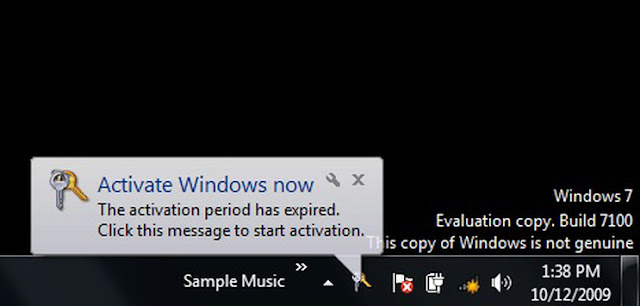
Windows 7 Genuine Notification

Many Guys Suffering from this problem . It will always show you a warning that you may be a victim of software counterfeiting and that your Windows is not genuine. It will show up on your logon screen and make you wait for some seconds.So today i post the software with tutorial to help you remove this type of notifications completely fom your windows 7.

First of all Download the RemoveWat Software from the below link:-

  
If Link is not working then click here

Now Follow These Simple Steps:-
  • After Downloading RemoveWat extract it to your computer and open removewat.exe
  • Now click on removewat.exe and you wait just few minutes . because after sometime it's totally done. 
  • Then Restart Your system .You can see that windows 7 Genuine Notification is removed.
  • You are Done!! 
Hope this tut helpful for you.Don't forget to drop your comment!
Read More


Nowadays i am hearing many of Facebook account has been hacked. Facebook accounts are hacked to gain personal information.You need to be very careful in protecting your Facebook account. So please follow some simple steps to protect your Facebook Account.

Use strong passwords
Always make a strong password with special characters and alpha numeric keys. This will be useful in protecting your account. Don't simply use a word or name or Date of Birth.The shorter your password, the easier it is to hack, especially if it’s a common word or name. A good starting point is six characters, though 8, 10 or 12 are even better. If you have trouble remembering, do something about that, else consider using an unusual phrase or combo of words that only you or a few people might know, then substitute some of the letters with digits and/or punctuation. It is advisable to use both capital and small letter in your password. Have a unique password. It should not be used by you for others such as e-mail or other social networking sites.


Don't make Everyone as your friend
Avoid the person who doesn’t even have a profile pic, let alone any friends in common with you.Don't accept all the friend request you get. This is very important one. Accept only the person you know. Because most of the people are accepting all the request they get.

Change your password Frequently
By Changing your password in monthly or even weekly, not yearly. Facebook’s “Forgot password?” option is one way, or you can go to your account’s settings.

Don’t click on links that are not Trustworthy
While you log in to your facebook account don't click the links that you see in facebook. Because all the links are not trustworthy. Similarly always log in to your Facebook from the Facebook home page. Don't click on the links that you get to your mail and log in.

Don’t believe all emails
As you know that honest web services will never ask you to do certain things in an email. For example, Facebook will NEVER send you an email asking you to change your password or enter personal details. If they need you to do that, they will tell you where in your account settings you can go to do that.On a similar note, protect your email account that you registered for Facebook with, else someone can succeed in resetting your Facebook password.

Use Private Browsing
By the use private browsing. When you log out then just delete the cookies. Don't click Remember Me.
Read More
Previous PostOlder Posts Home